Should you expect a lower hourly rate for remote engagements?

Most of us would love an engagement, from time to time, that takes us off the road. The benefits of work life balance and increased time at home with family is significant. Not to mention being able to work in your pajamas, if you so choose, is enticing to some. The question I hear often is why the hourly rate is so much lower for a remote engagement. Below are my thoughts on what you may be facing when looking at remote project support roles.
Let’s start with the basics associated with the sales side and bidding on business and negotiating bill rates. When positioning cost to the client, firms take many different aspects into consideration. These include; skill set needed, level of expertise, years of experience, specific deliverable expectations, duration of contract, location of contract, required margins, and yes…is there remote opportunity. From a sales perspective firms take these requirements and look at market value while trying to find opportunities to be competitive in their pricing. The idea of working remote saves the client on costs related to travel for sure. Knowing that working remotely is also appealing to consultants gives the firm another option to reduce cost to the client by cutting professional service fees as well.
Positioning the up side of working a remote project often falls on the recruiter. They also have the challenge of getting you to agree to a lower hourly pay rate. Just like a full time job at your local hospital, your annual compensation would be reduced as you are not traveling long distances every week and away from home during off time. The answer to the question is simple, your hourly rate takes travel and time away from home into consideration. You can expect an average of 10% reduction in hourly pay for remote work…which really isn’t bad at all. So if you are used to making $95, you’ll likely be offered $85 for remote work.
Not everyone has this happen to them. However, I believe it’s become more the norm to meet the demands of the client. Take a look at the example below to see the big picture.
EXAMPLE
| Candidate Requirements – The client is seeking a certified Epic OpTime analyst to assist with their Refuel project for the next 3 months. They require a candidate with a minimum of 3 years of build experience and prefer they also have anesthesia certification, but it’s not required. They are located in San Francisco with several facilities throughout Northern California. They are open to remote work, but need to understand the cost benefit.
Average Cost – Let’s assume the average market rate for an OpTime analyst with 3 years’ experience is $140 an hour. Then let’s take the cost associated with weekly travel and lodging in San Francisco for 3 months. Professional fees would come in at $67,200 and expenses would fall at about $16,000. That’s $83,200. Opportunity for Savings – The firm knows that client will be enticed just by removing the cost associated with expenses. But they want to also lower the professional fee since the work is all remote. The firm has been successful by typically offer about a 10% discount on remote efforts. By doing so the new cost to the client will be $60,480 in total. That’s a whopping 25% savings with a guarantee on same quality and delivery from the firm. |
There are a lot of opinions on what is impacting project costs when using an outsourcing firm. Without a doubt, as quality of delivery becomes a major focus for firms, clients will continue to look into remote options. The trust of quality is there. Moving forward you’ll see more opportunities presented to you that will be remote, but like come with a lower rate.
Have you take a lower rate for remote opportunities? Leave your comments below.
Contract to Hire…Do I have to Accept the Full Time Position?

I’ve seen a consistent increase in the request for contract to hire positions this year. Firms are adding language to their service agreements to allow clients to extend an offer for permanent full time positions to consultants after 90 days of contracting. Clients are using firms to find resources who are open to relocating and becoming a full time employee of the hospital. It’s really a win win scenario for both the client and consultant. The question is, if you accept a contract to hire role…do you have to accept the full time position?
I suggest candidates take these types of offers seriously and not waste anyone’s time if they are not truly interested in relocating or taking a reduced salary. Too many times I see candidates begin the interview process but when it comes time to accept the offer, they turn it down. Realize that these opportunities are meant to fill a permanent position and will come with a salary associated with being a FTE, not a contractor. My suggestion is ask right away the terms of employment including relocation reimbursement (if any), firm to client transition time frame agreement, and expected salary.
That first 90 days is the time for you to begin planning your transition, including relocating. Terms of your employment are typically agreed upon prior to you starting. Timing on the transition may vary based on the firm’s agreement with the client. Typically it’s 90 days, but may be less. Regardless, once you’ve accepted and started, it is expected that you will accept the terms of employment and become a FTE at the end of agreement. So my advice is simple…do not accept a contract to hire role unless you are 100% committed to accepting the full time position.
A couple more thoughts on variations of contract to hire. Not all hospitals will make a full time offer before you start your contract. In fact, many won’t offer information on salary prior to starting either. That first 90 days may be considered a trial period to determine if your skill set aligns with the position. Your firm should know this is the expectation ahead of time, so you are fully aware a full time offer may not result from the contract. You should also know that it is becoming more common to hear from clients that they want direct to hire candidates. That situation obviously is much different…but worth mentioning.
Have you taken a contract to hire position? Share your thoughts in the comments field below.
What Consultants Should Know About CHIME, HIMSS, MGMA and Others

Our industry has several organizations that are focused on professional development, networking, and innovation. Understanding these different groups and how your firm participates can greatly improve your awareness of industry trends, various client initiatives, upcoming projects, and other opportunities. I’ve selected three that you should be aware of and understand how your firm’s involvement may help you with future placements and project support work. Let’s take a look at CHIME, HIMSS, and MGMA first.
CHIME (College of Healthcare Information Management Executives) The College of Healthcare Information Management Executives (CHIME) is an organization created to serve the professional development needs of CIOs working in the healthcare industry and to promote effective information management within that industry. CHIME meets these objectives through networking and education opportunities as well as partnerships with health information technology vendors and service firms. The organization was formed in 1992.
More than 1,400 health care CIOs are currently members of CHIME. According to the organization, its members come from hospitals, clinics, physician groups, government agencies and health information exchanges, and their responsibilities include telecommunications, medical records and information services. CHIME members also often serve as chairpersons for IT steering committees.
CHIME’s current advocacy initiatives include helping CIOs implement the hardware, software and security measures necessary for digitizing patient records, which is one requirement for achieving the meaningful use of electronic health records (EHR). CHIME’s Fall CIO Forum is being held in San Diego from October 30th – November 2nd 2018.
HIMSS (Healthcare Information and Management Systems Society) The Healthcare Information and Management Systems Society (HIMSS) is a nonprofit organization whose goal is to promote the best use of information technology and management systems in the health care industry.
Founded in 1961, HIMSS provides a forum for collaboration among the various stakeholders in health care IT, using advocacy, education and collaboration to further its mission. Its membership base of more than 44,000 individual and 570 corporate members includes health care providers, students, IT vendors, consultants and other stakeholders in the health IT industry. HIMSS currently focuses its attention on health IT topics such as electronic health record systems, HIPAA security and privacy provisions, software interoperability and technical standards.
HIMSS produces an annual conference that brings together health IT stakeholders for several days of education and networking. The organization also offers a research arm known as HIMSS Analytics and a philanthropic group known as the HIMSS Foundation. HIMSS 2019 Annual Convention is being held in Orlando from February 11th-13th. Regional conferences and events happen monthly.
Medical Group Management Association (MGMA) is a key element in perpetuating success throughout the healthcare industry. The organization provides resources to initiate change and drive results. With exceptional peer-to-peer and mentor-to-peer support systems as well as abundant hard-copy and digital resources, MGMA is spearheading the path to healthcare advancement. They are well known for providing members with consistent expert resources and solutions that include, but are not limited to:
- Educational collateral and certifications
- Success strategies for students, healthcare practices, and employment needs
- Innovative ideas and networking events
- Expertly compiled benchmarking data and statistics
- Access to industry experts and thought leaders
- Information and materials for making your practice more successful and profitable
There are several others that you may hear about. Health Connect Partners (HCP) focuses on areas including IT, Pharmacy, Radiology, and the OR (Read More). The Institute for Healthcare Improvement (IHI), provides insight and partnerships focused on health care improvement worldwide (Read More). And Academy Health hosts its annual Health Datapalooza which is a large conference which exists to promote access to open data in the United States for the purpose of improving public health.
As a consultant, we all should be aware of our firms participation and/or sponsorship of these organizations. Let’s be honest, the primary reason for a firm’s involvement is expected return on investment by identifying new clients, building relations, and showcasing capabilities. That directly impacts you and your future opportunities for placement. You could be a self promoter by sharing with your client how your firm supports these organizations. Additionally you could be asked to represent your company…so always be aware of your firms involvement.
What organizations are you or your firm a member? Share your thoughts and comments below.
State vs Federal Holidays – How they Impact Consultants

Monday is Columbus Day. A recognized federal government holiday where all federal offices and banks are closed. However, it is not recognized in 27 states. Interestingly enough not one west coast state celebrates the holiday while all of the east coast states minus Florida, New Hampshire, and Vermont do. Then we have states that use the same day for other holidays. South Dakota has Native Americans Day and Hawaii has Discoverers’ Day for example. Both are official state holidays. Every year I am asked the same question, “Do I get the 2nd Monday of October off as a recognized holiday.” Sadly, the answer is no for most consultants.
There are 11 federal holidays which include; New Year’s Day, MLK Day, President’s Day, Memorial Day, Independence Day, Labor Day, Columbus Day, Veterans Day, Thanksgiving, and Christmas. Hospitals often provide these but allow for a “float holiday” to be used on any day. If you are in one of those 27 states that does not recognize Columbus Day you are out of luck. However the list may also contain various religious holidays like Easter or Yom Kippur, which is a public holiday in Texas by the way. There are several state holidays to consider as well. Massachusetts and Maine celebrate Patriots Day for example. I strongly encourage you to ask your firm and your client for a complete list of recognized holidays.
Regardless of all these variations of holidays, you should plan your travel around the client’s expectations for their full time employees. While being a consultant who lives in another state may warrant you wanting the day off, I suggest you follow the client’s normal process. Ask well in advance…and plan accordingly. Even for those big holidays like Christmas…is the day after or day before recognized? Are you required to travel if the holiday is mid-week? These are all things you should get clarified well in advance. IT offices don’t shut down in hospitals, ever. You may be asked to work on those holidays you would otherwise expected off.
Have you ever thought you had a holiday off but didn’t at a client? Share your experience in the comments field below.
Crying Babies and Crazy Passenger Antics – Airlines Approach to Passenger Comfort

There are several stories this month that made headlines regarding airlines approach to the crying infants and unruly passengers. Evidently a United airlines attendant said it was “absolutely unacceptable” that a baby was crying to a mother. This was on a 13 hour flight from Sydney, Australia to San Francisco in first class. On a Southwest flight a family was booted off the plane from Chicago to Atlanta as their 8 month old was throwing a tantrum prior to departure. A United flight from Heathrow to Washington Dulles turned back one hour into the flight as a passenger was just randomly screaming and cursing. My favorite one is the Chicago flight on ANA Airline where a drunk passenger urinated on a man two rows behind him and was restrained for the duration of the flight. We all have stories and have seen some wild crazy behavior. The question is how should you and the airline respond?
After some research I found that airlines have several clear policies regarding passenger comfort and issue management. The easy ones to find include approach to obese passengers, emotional support animals, intoxicated passengers, infant seating requirements, pets, luggage handling, and dozens of common sense items. I couldn’t find anything on airlines policy on crying babies. According to the attendant from United on that Sydney flight, there is a policy that states babies should not be allowed to cry for more than 5 minutes. How the heck do you enforce that? I think she made that up.
For those unruly passengers who are confrontational to fellow passengers and/or staff…there are some guidelines and policies, but they are primarily discretionary. Airline staff are empowered to confront passengers based on their interpretation of actions that may; put other passengers at risk, are violating other passenger’s privacy, are disrespectful to the staff, or may impact the overall safety of everyone. Consequences include restraining or evicting passengers. Either of which may also include a fine and/or arrest.
For your own piece of mind, don’t get involved with these type of passengers…you don’t want your travel interrupted. Invest in a good set of noise-cancelling headsets. Watch a movie or read a book. While you should always try to be courteous, don’t engage with a fellow passenger complaining about the service. It’s a slippery slope and may inadvertently have repercussions for you as well. I am not suggesting you have to tolerate rude behavior, just don’t verbally participate. Call your attendant over and make them aware of the issue.
What about those screaming infants? I used to get so upset. I remember sitting in first class next to a mother who had one child and her husband was two rows back with another child. Throughout the flight they just kept swapping screaming kids. Everyone in first class was given 5000 sky miles. These days I just turn my music on full blast and get caught up on work. Let’s face it, kids are kids. You’ll fade away into your own happy place with good music and good headsets and hopefully arrive at your destination on time.
Have a funny passenger story to share? Write your comments below.
J.D. Power 2018 North America Airport Study – How did your airport rank?
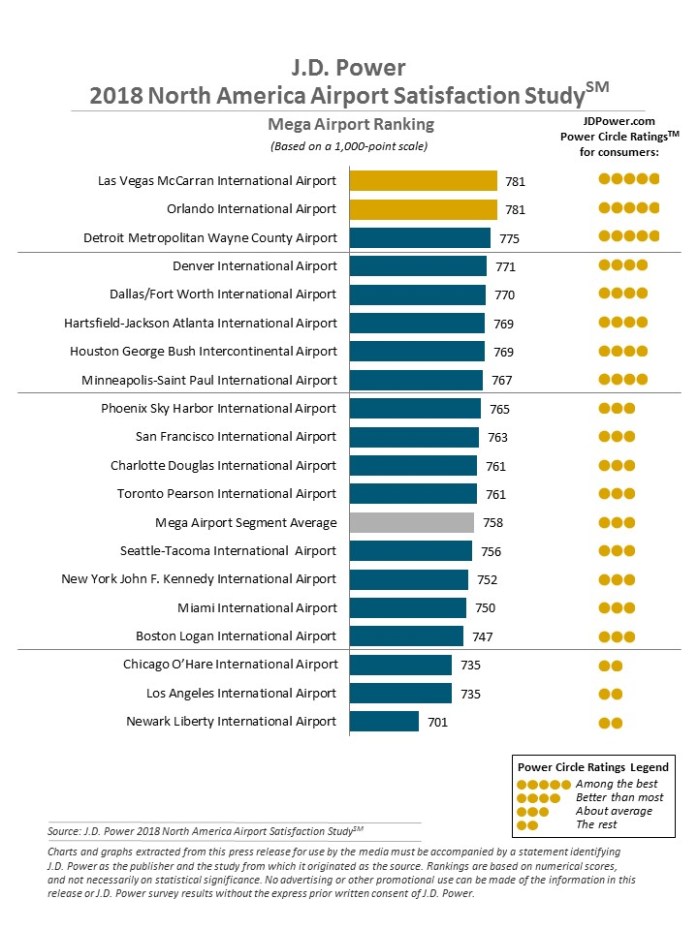
I always look forward to this annual study. This one is specifically ranking the airport based on traveler’s satisfaction of services and amenities. No surprise my airport (BOS) continues to be all the way at the bottom. Note that the study focuses on 6 areas that include; terminal facilities, airport accessibility, security check, baggage claim, check-in/baggage check, and food, beverage and retail. To read the full report (click here). Below is a quick snap shot.
The chart above is for the mega airports, other results included:
John Wayne Airport, Orange County ranks highest among large airports, with a score of 815. Dallas Love Field (810) ranks second and Portland (Ore.) International Airport (804) ranks third.
Buffalo Niagara International Airport ranks highest among medium airports, with a score of 814. Indianapolis International Airport (811) ranks second and Fort Myers/Southwest Florida International (810) ranks third.
Surprised by the results? Share your comments and thoughts below.
How State Labor Laws May Impact Your Engagement and Pay Check

In the last year we’ve seen several firms in the news for employment breaches of labor laws. It was just a year ago this week that we saw Arrington vs Optimum Healthcare all over the news. That lawsuit was impacted by 7 different state labor laws for just two consultants. I wanted to share some thoughts specifically on California labor laws, as an example, in this article. This is just a small glimpse of what firms and consultants have to be aware of.
The question I hear all the time is simply, as an out-of-state employee on an assignment in California, do overtime provisions of the California Labor Code apply to me during the assignment? Working for a San Francisco based company with a lot of client’s in the state of California, I’ve become all too familiar with the states labor laws there. The answer to that question by the way, according to the California Supreme Court case, Sullivan v. Oracle Corp., is “yes.”
That answer has daunting implications to consulting firms. The California Labor Code is unlike any other. The California Supreme Court decided that California overtime law applies to visiting employees. As many consultants are hourly and non-exempt, these may apply to you as a consultant. When I worked for a different firm a few years ago, we spent months identifying exempt vs non-exempt roles. We paid everyone that was identified as non-exempt past pay for the last 2 years for any overtime worked. Precautionary steps to obviously assure alignment with state and federal employment laws.
California’s Labor Code is all inclusive. California’s overtime laws apply by their terms to all employment in the state, without reference to the employee’s place of residence. A section of the wage law confirms that CA employment laws apply to “all individuals” employed in this state. The overtime statute, Labor Code section 510, declares simply that “any work in excess of eight hours in one workday and/or . . . 40 hours in any one workweek . . . shall be compensated at the rate of no less than one and one-half times the regular rate of pay . . . .”
Employers with non-exempt out of state employees traveling to California should reinforce California’s overtime rules. The most significant difference between California overtime law and most other states is that in California, overtime is owed hours in excess of 8 in a workday. As a consultant we often work Monday – Thursday for 10 hours a day. That’s 2 hours of OT for each day based on the law. Most clients will not pay that…so you are forced to work 4 days onsite at 8 hours and Friday is either remote, or you lose those hours.
It is truly imperative that as a consultant you be aware of the laws and requirements of the state you are currently working in. You should also check with you firm on whether your position is considered a non-exempt role.
A couple other general (non-California specific) items below.
- The law of the state where you are physically working is the law that applies, no matter where your company is located or based.
- Residency tax laws are based on where you live.
- States with no income tax are for full time residents only and does not apply to those working in the state that live elsewhere.
- You may be responsible for paying state taxes in both your home state and those you’ve worked in if your contract is over a year.
- The Fair Labor Standards Act (FLSA) prescribes standards for wages and overtime pay, which affect most private and public employment.
Read more from the Department of Labor…(Click Here)
It’s the Busiest Time of Year – Are you ready to be submitted?

September and October are the busiest months of the year for new placements. Budgets are approved, projects are kicking off, and resources are needed to be locked in before the holidays. For Epic consultants, some major implementations are kicking off and you can expect to hear from several firms. Are your ready to be submitted? Here are a few action items you should consider in order to be prepared.
The first is the easiest, your resume. Be sure to update it now, even if you are still wrapping up with your current client. Add your most recent engagement with details on your role and deliverables accomplished. I’ve written several articles on resumes, but just as a reminder…keep it to 2-3 pages. Some clients won’t accept more than 2 pages, so have several versions available. I like to have versions available for different kinds of roles like a Project Manager resume and an analyst resume. You don’t want to slow down your submittal in this competitive market because you don’t have an up to date resume.
Complete any work needed to update your credentials. Whether that’s PDUs for your PMP certification, CEU’s for nursing license, or CEE requirements for Epic. This time of year it’s not unusual to see 9 – 12 month contracts. You don’t want to impede on your ability to commit to such a lengthy engagement because you haven’t completed these. For Epic, I’m already seeing clients asking for up to date CEE requirements through 2018 (even though it just came out). Keep yourself one step ahead of other consultants by being up to date.
Take vacation now! One of the top reasons why I see consultants be declined is due to scheduled vacations. I would say that majority of contracts starting in the next month will go through the end of the year. Very few clients would want to lose a resource for a week or more during that time because they have scheduled vacation. Not to mention many clients put a PTO freeze during 30 days leading up to go-live. While we have both Thanksgiving and Christmas around the corner, those are expected days out…not an October cruise to the Caribbean.
My last suggestion is more personal, but the weather is changing…so get yourself set up for winter and go shopping for some warmer clothes. You could be asked to take a role in Bismarck or Miami…who knows. You’ll be thankful you have options for any time of year. I always enjoy visiting Duluth in January, it reminds me of what real cold feels like.
Have other suggestions to be prepared for that next recruiter call? Share your comments below.
Bigotry in the office – How do you respond?

In today’s world of social media and a growth in intolerance towards those who hold a different opinion from oneself, bigotry has surfaced into our daily lives, even in the office. No one wants to think of themselves as a bigot, or racist, or a bully. However there are those whose social media posts are appalling; rants and ravings of their own beliefs and agendas. Even at work prejudiced people sometimes inadvertently make comments that insult ethnic co-workers, female staff, people who are LGBTQ, or even the disabled. It’s usually subtle, but can add a new challenge to doing our job. How do you respond to these comments in the work place while maintaining a professional composure expected of a consultant?
Let’s first try to understand the mindset of the bigot. We all know that HR policies strictly prohibit racism, sexism, and other forms of bigotry. Human rights laws are in place to ensure equal treatment. Regardless, biases stem from the community, home, and/or upbringing. Usually ingrained early by their parents, friends, or colleagues. While the workplace deters behavior associated with bigotry, employees rarely face enough deterrents to change their behavior. And since it’s such an uncomfortable subject, most are not even aware of their actions as they are never called out on it. A bigot feels superior to others and negatively judges based on skin color, gender, sexual orientation, or even country of origin. Understanding this idea of superiority can help you find firm ground to stand on when dealing with bigotry, especially when it’s subtle enough to go unnoticed by others.
I have a few recommendations, but let me preface that none are a solution to the bigger issue, but may assist for the short term of your engagement at the client. First, try to avoid the offender as much as possible. That may not be feasible at work, so you do need to let the person know the impact their behavior is having on you on your ability to do your job. Ask them for a moment of their time for a discreet discussion. Give examples of what they’ve been doing on how it is impacting you. Ask if they realize how uncomfortable it’s making you. If other co-workers have raised concerns include them in the conversation. Awareness is sometimes all it takes to stop the action, but it won’t stop the offender’s thoughts or beliefs. That’s OK, they can go home and post whatever they want on Facebook, but they need to keep it professional in the office…and they need to know that.
Make sure you document the discussion for future reference and be prepared to escalate if initial efforts fail. Begin with your boss at your firm and see if perhaps the two of you can brainstorm on other approaches. Making them aware of the issue is imperative if the behavior is directly impacting your performance. Next would be the client manager which could lead to involvement of HR. Don’t put your contract at risk. Dealing with these situations is a part of what we do, unfortunately. Expressing your concerns and requesting action take place in order to ensure a safe and productive work environment should be expected. I can’t promise how every manager will receive or react to you, but saying nothing…means nothing will change.
I hate to say this, but the current division of our country and this type of mindset is everywhere. As a consultant we need to be prepared to have engagements in any town, city, or state. Sure, there are areas that may have a greater presence of narrow minded ignorant bigots, but doesn’t mean any of us have to tolerate it. Let’s tackle this together.
How have you handles situations in the past? Share your comments below.
20 Years at Epic’s UGM

It’s hard to believe I’m coming up on my 20th year of working with Epic. I’ve been very fortunate to create a career out of my exposure to Epic systems and have been a part of so many fantastic projects and organizations in that time. As thousands of Epic end users board planes today and tomorrow to attend Epic’s UGM, I thought it would be fun to look at the changes of the event over the years. Some greatest hits and some terrible tragedies have impacted the event, and I’m sure everyone has great stories. Here is a look back at some of my memories.
Before Epic’s Intergalactic campus in Verona, UGM was held in downtown Madison at the Monona Terrace. With under a 1000 attendees, the venue was ideal for breakout sessions and workshops. Meals were served on the rooftop deck for several years while evening events were hosted in the conventions center main hall. Tuesday morning’s general session was just a short walk away to the Oscar Meyer Theater. From 1998 to 2001 this was the ideal setting for Epic to host their annual user group meeting. Some great themes and great exchange of information with Epic customers across the country.

On Tuesday September 11, 2001 there were 1200 attendees at the Oscar Meyer Theater for the general session. The screen changed from the presentation to live TV just as the second plane hit. People poured out of the auditorium and onto the streets. Lines formed at every pay phone and generous attendees, who had cell phones, lent them out to strangers to call home. Judy announced the meeting would go on as so many of us were stuck with the airport being closed. Being from Boston myself, we had an extended visit until we finally got a truck and drove home…9 people in 8 passenger van with all out luggage. The entire Epic team was accommodating and truly a wonderful host during a time of crisis of the entire nation.


2003 and 2004 saw a significant increase in attendance, 2300 to 3300, so it was time for a change in venue. The Alliant Energy Center would host the years of Lord of the Rings and Superhero themed meetings. New applications in ancillary services and lab systems was the big buzz for end users and the introduction to GUI based build options excited builders.
 Early Epic campus picture
Epic opened its doors at the new Epic campus in 2005 and has hosted UGM there since. Voyager Hall was the home of UGM for several years. The u shaped double level training center served as the perfect venue for breakout sessions and held a large auditorium for the General Sessions until 2013.
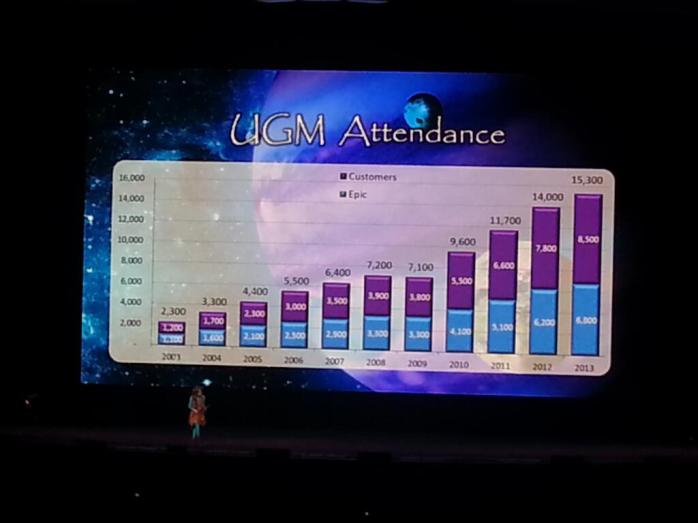
By 2013 attendance had grown to over 13,000. Above is my poor quality picture with Judy showing the growth of the event year over year. Thus the introduction to probably one of the coolest auditoriums I’ve ever been to, Deep Space.


Epic’s Deep Space Auditorium (click here for an awesome look at the design and history of the auditorium).
Epic continues to keep UGM about the client and for the client. Limitations of invites to those in consulting continues to be a trend. The vendor showcase area stopped allowing 3rd party consultant firms to attend in 2013. Those of us who have been lucky enough to get invited have taken full advantage of learning of Epic’s areas of focus, growth, and initiatives that impact all of us who use Epic daily. The new auditorium at over 11,000 is already to small to host all the attendees. With the growth of XGM, I think UGM will flat line around 14,000 combined attendees (employees and clients) over the next couple years.

Over all my years, I’ve always enjoyed watching Judy take on the theme. I took this picture at 2013 UGM and remember all the times she came out on stage and would own it! In 2014 she started by announcing that Epic was acquiring General Electric…you could hear a pin drop. Then she said, “just kidding.” I’m sure Judy will do something to surprise us all this week as well.
Have stories from UGM? Share them in comments below.
Click on my image below for my Professional Profile

 consultant-tips.blog
Comments