Bigotry in the office – How do you respond?

In today’s world of social media and a growth in intolerance towards those who hold a different opinion from oneself, bigotry has surfaced into our daily lives, even in the office. No one wants to think of themselves as a bigot, or racist, or a bully. However there are those whose social media posts are appalling; rants and ravings of their own beliefs and agendas. Even at work prejudiced people sometimes inadvertently make comments that insult ethnic co-workers, female staff, people who are LGBTQ, or even the disabled. It’s usually subtle, but can add a new challenge to doing our job. How do you respond to these comments in the work place while maintaining a professional composure expected of a consultant?
Let’s first try to understand the mindset of the bigot. We all know that HR policies strictly prohibit racism, sexism, and other forms of bigotry. Human rights laws are in place to ensure equal treatment. Regardless, biases stem from the community, home, and/or upbringing. Usually ingrained early by their parents, friends, or colleagues. While the workplace deters behavior associated with bigotry, employees rarely face enough deterrents to change their behavior. And since it’s such an uncomfortable subject, most are not even aware of their actions as they are never called out on it. A bigot feels superior to others and negatively judges based on skin color, gender, sexual orientation, or even country of origin. Understanding this idea of superiority can help you find firm ground to stand on when dealing with bigotry, especially when it’s subtle enough to go unnoticed by others.
I have a few recommendations, but let me preface that none are a solution to the bigger issue, but may assist for the short term of your engagement at the client. First, try to avoid the offender as much as possible. That may not be feasible at work, so you do need to let the person know the impact their behavior is having on you on your ability to do your job. Ask them for a moment of their time for a discreet discussion. Give examples of what they’ve been doing on how it is impacting you. Ask if they realize how uncomfortable it’s making you. If other co-workers have raised concerns include them in the conversation. Awareness is sometimes all it takes to stop the action, but it won’t stop the offender’s thoughts or beliefs. That’s OK, they can go home and post whatever they want on Facebook, but they need to keep it professional in the office…and they need to know that.
Make sure you document the discussion for future reference and be prepared to escalate if initial efforts fail. Begin with your boss at your firm and see if perhaps the two of you can brainstorm on other approaches. Making them aware of the issue is imperative if the behavior is directly impacting your performance. Next would be the client manager which could lead to involvement of HR. Don’t put your contract at risk. Dealing with these situations is a part of what we do, unfortunately. Expressing your concerns and requesting action take place in order to ensure a safe and productive work environment should be expected. I can’t promise how every manager will receive or react to you, but saying nothing…means nothing will change.
I hate to say this, but the current division of our country and this type of mindset is everywhere. As a consultant we need to be prepared to have engagements in any town, city, or state. Sure, there are areas that may have a greater presence of narrow minded ignorant bigots, but doesn’t mean any of us have to tolerate it. Let’s tackle this together.
How have you handles situations in the past? Share your comments below.
20 Years at Epic’s UGM
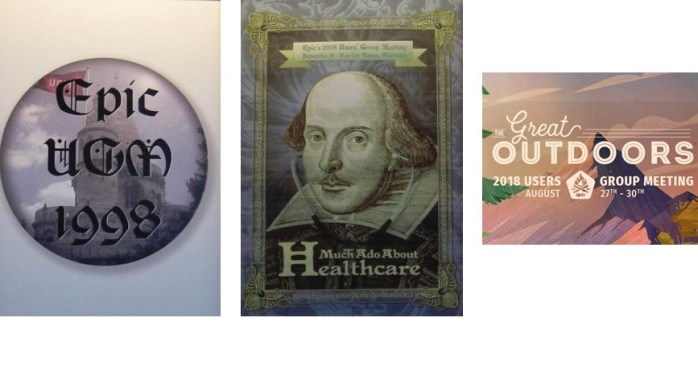
It’s hard to believe I’m coming up on my 20th year of working with Epic. I’ve been very fortunate to create a career out of my exposure to Epic systems and have been a part of so many fantastic projects and organizations in that time. As thousands of Epic end users board planes today and tomorrow to attend Epic’s UGM, I thought it would be fun to look at the changes of the event over the years. Some greatest hits and some terrible tragedies have impacted the event, and I’m sure everyone has great stories. Here is a look back at some of my memories.
Before Epic’s Intergalactic campus in Verona, UGM was held in downtown Madison at the Monona Terrace. With under a 1000 attendees, the venue was ideal for breakout sessions and workshops. Meals were served on the rooftop deck for several years while evening events were hosted in the conventions center main hall. Tuesday morning’s general session was just a short walk away to the Oscar Meyer Theater. From 1998 to 2001 this was the ideal setting for Epic to host their annual user group meeting. Some great themes and great exchange of information with Epic customers across the country.

On Tuesday September 11, 2001 there were 1200 attendees at the Oscar Meyer Theater for the general session. The screen changed from the presentation to live TV just as the second plane hit. People poured out of the auditorium and onto the streets. Lines formed at every pay phone and generous attendees, who had cell phones, lent them out to strangers to call home. Judy announced the meeting would go on as so many of us were stuck with the airport being closed. Being from Boston myself, we had an extended visit until we finally got a truck and drove home…9 people in 8 passenger van with all out luggage. The entire Epic team was accommodating and truly a wonderful host during a time of crisis of the entire nation.
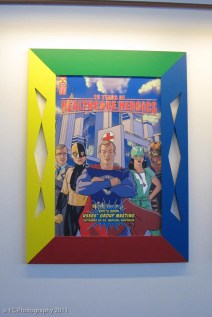

2003 and 2004 saw a significant increase in attendance, 2300 to 3300, so it was time for a change in venue. The Alliant Energy Center would host the years of Lord of the Rings and Superhero themed meetings. New applications in ancillary services and lab systems was the big buzz for end users and the introduction to GUI based build options excited builders.
 Early Epic campus picture
Epic opened its doors at the new Epic campus in 2005 and has hosted UGM there since. Voyager Hall was the home of UGM for several years. The u shaped double level training center served as the perfect venue for breakout sessions and held a large auditorium for the General Sessions until 2013.
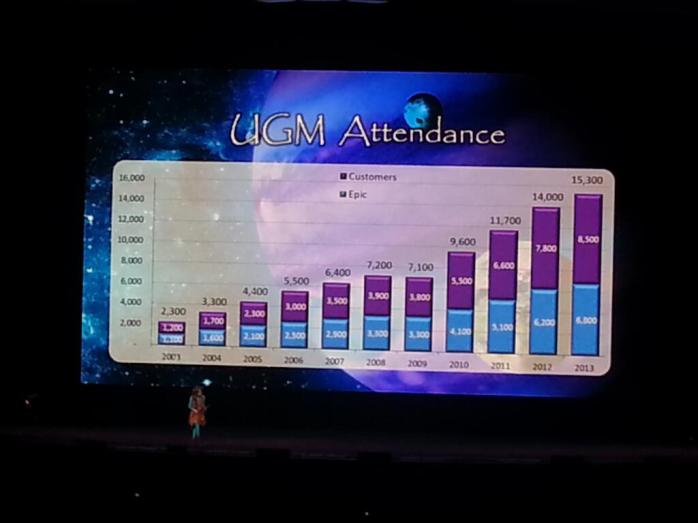
By 2013 attendance had grown to over 13,000. Above is my poor quality picture with Judy showing the growth of the event year over year. Thus the introduction to probably one of the coolest auditoriums I’ve ever been to, Deep Space.


Epic’s Deep Space Auditorium (click here for an awesome look at the design and history of the auditorium).
Epic continues to keep UGM about the client and for the client. Limitations of invites to those in consulting continues to be a trend. The vendor showcase area stopped allowing 3rd party consultant firms to attend in 2013. Those of us who have been lucky enough to get invited have taken full advantage of learning of Epic’s areas of focus, growth, and initiatives that impact all of us who use Epic daily. The new auditorium at over 11,000 is already to small to host all the attendees. With the growth of XGM, I think UGM will flat line around 14,000 combined attendees (employees and clients) over the next couple years.

Over all my years, I’ve always enjoyed watching Judy take on the theme. I took this picture at 2013 UGM and remember all the times she came out on stage and would own it! In 2014 she started by announcing that Epic was acquiring General Electric…you could hear a pin drop. Then she said, “just kidding.” I’m sure Judy will do something to surprise us all this week as well.
Have stories from UGM? Share them in comments below.
Contract Management – A Review of Documents and Processes

Many consultants ask me why they can’t be submitted to a certain client by their firm. Others inquire on why rates are so low or why some roles offer remote work and others don’t. Variations of conditions of a contract are pre-determined via a series of agreements. Understanding all the work that your firm does to manage consultant contracts can be beneficial to you.
Below is an in-depth look at the various agreements and processes that firms all follow. Familiarize yourself with these terms and acronyms. You’ll have a far more in depth understanding of the potential contract you are talking to your firm about.
Request for Proposal (RFP)
Most clients begin their projects by looking at external staffing needs and sending out a request for proposal (RFP) to firms. Some client’s may select firms they are inviting to bid based on vendor referrals, KLAS ratings, and/or past work history. State or Community Hospitals open up the RFP to anyone who would like to respond. The RFP typically includes a history of the client, a summary of the project, timelines of the project, listing of all potential roles needed to be filled, and requirements for those roles.
All firms’ responses will also include a history of the firm and a summary of the type of services offered. Firms will vary their responses to align with the specific needs of the project. You would see one type of response for a full implementation support RFP and another for let’s say a Community Connect RFP. What is consistent across responses is a competitive pricing proposal whether that is in hourly rates, all-inclusive rates, or sometimes even a fixed fee. Based on the RFP, there may be questions on everything from where has the firm provided services before, how do they obtain and retain talent, recruiting practices, size of practice, request for references, and much more.
If being asked to provide a resume as part of a submittal of an RFP, be sure your firm is being transparent with you. So many firms will ask for right to represent and make you think you are locked into them. That wouldn’t be appropriate at all. What if the firm that presents you is not selected? I should also mention that many times the client may take weeks or even months to make a decision. Therefore, how could you possibly be locked into any single firm? The likeliness of you still being available all that time later is minimal.
Master Service Agreement (MSA)
All clients require a firm sign a service agreement before they can provide resources. A MSA is what determines what kind of services a firm may provide and the processes for doing so. Typically based on the RFP selection, firms are offered to agree to the terms of the MSA once selected. The MSA highlights requirements of the client for behind the scenes including insurance coverage, invoicing, contract processes, renewals, extensions, early releases, etc. The agreement will often include the process for consultant submittals and the format in which they want to receive information on the consultant. Clients will limit the number of service agreements, usually. Meaning you may hear of an opportunity at a client from another firm, but your firm doesn’t have it because they don’t have an MSA with that client.
Another way a MSA may impact a consultant is limitations of services outlined within the agreement. Often time’s clients will award a firm to provide one type of resource but not another. Let’s use trainers as an example. If my firm wins an RFP for training and activation support, my MSA will state I can provide those types of consultants but not builders or other roles. This is typically true for major implementations. For example, a current RFP that is out there for the University of Illinois has 4 types of service offerings. Winners for each of those areas would have a MSA that permits them to submit candidates for engagements within that specific service.
Vendor Management Systems (VMS)
Many clients have decided to use a third party agency to assist with managed services of their outsourcing needs. Managed service companies will use a vendor management system (VMS) to enter opportunities, collect submittals and resumes, and literally oversee the entire selection process for each engagement. RightSourcing is one example of such an agency. They have VMS partnerships with companies including PeopleFluent, Fieldglass and WAND. When a client uses a managed services agency, all communication is handled through them, not the client.
Benefits the client are simple. The agency will use the VMS to manage all aspects of consultant services including: sourcing, selection process, budget management, duration control, compliance/onboarding, payment management, billing and invoices, off boarding, evaluations, and requisition management. Many firms complain about this because it truly limits communication with the actual client. Being submitted for opportunities through a VMS has little impact to you the consultant. But understanding your client’s management system process should be shared with you.
One other thing to mention is that Managed Services charge x% off each hour billed. Typically around 3% which means the hourly rate we offer the client directly impacts the firm’s margins.
Purchase Orders (PO) or Work Orders
A purchase or work order is a document that acts as the first official offer issued by the consultant firm to the client, indicating types of resources, quantities, and agreed prices for services. Work orders and invoices are used when a company or contractor performs services for customers and bills them for those services. A work order is sometimes called a purchase order, which is also used when a customer typically wants to buy specific deliverables rather than staffing services. These are used to control the purchasing of services from external staffing firms, typically by pre estimating professional fees and expenses. A work order needs to be updated when those funds are exhausted and/or extensions are requested.
In addition, the client will always clearly and explicitly communicate their requests to the consultant firm so there is no confusion when the purchase or work order is received. This means it would include agreed on bill rates, per Diem, travel expenses (how often you can go home), and timing of billing. In the event the client refuses payment, the consultant firm is protected because the purchase order is a binding contract between both parties.
Invoices
Finally, an invoice is a document sent by the firm to the client on a bi-weekly or monthly basis. It is a summary of the services and/or actual hours and expenses offered to the client. It’s basically a bill for each hour the consultant(s) has worked within the billing timeframe. It is the responsibility of the firm to monitor hours billed and assure they align with actual hours worked. Many firms require consultants provide status reports to document completed work in order to justify hours billed.
Invoices are very specific and typically include:
- the date the invoice is issued
- the name and address of the consultant firm
- the name and address of the client
- the invoice number
- the purchase or work order number
- details and quantity of hours provided
- the agreed-upon prices
- any discounts or taxes
- the total amount that is due
- transaction terms and conditions (optional)
- payment due date
All these documents and processes require a lot of different people to manage. Hopefully having this glance into the behind the scenes activities was helpful. Please feel free to leave comments, questions, or request for additional information below.
If I let my Epic Certification lapse, or fail a third time…am I out of the game?

Never before have I received so many inquiries on whether or not a consultant should do the extra work to maintain their Epic certification(s). Nor have I seen so many consultants receive a consistent grade of 79% on the first and second attempts at the Continuing Epic Education (CEE) exam. A lot of consultants seem nervous or unsure of what will it mean if they fail or allow their certification to lapse. Epic extended the deadline from July 31st to August 31st, so time is running out. It seemed appropriate to share some thoughts on the subject given the timing.
My first question is always, how many certifications do you have and how many have you supported in the last 12 months? This is the easiest part of the debate in my opinion. It’s not unusual to see a consultant have 3 or 4 Epic certifications. If complimentary, let’s say Resolute PB, SBO, and Cadence, keep them all for sure. Otherwise, only focus your studies on the one or two applications you have highlighted on your resume for the last year. Whether you are certified or not will be secondary in comparison to your recent history of support on your resume. Carrying a certification for a module you haven’t supported in a couple of years is basically pointless. Not to mention, you’ll likely struggle to pass the certification exam. In our industry, more does not mean better.
A harder scenario to consider: You’ve been in a PM role or other non-build related position with a client and haven’t actually done build in a couple years. Almost every PM opportunity asks for the candidate to be certified, ideally. It’s not always required, but preferred. To remain marketable and competitive, you may want to maintain your certification, but know that it won’t make you ineligible for most opportunities. PM’s should have a PMP, it’s far more valuable. Six Sigma doesn’t seem to be as recognized.
Other opportunities I see often that don’t always require certifications include: analysts, trainers, integrated testing coordinators, cut over/technical dress rehearsal support, Command Center support, and obviously both CTs and ATE resources. Again, having that certification makes you more marketable but doesn’t disqualify you all the time. Remember, ideally build should be managed by FTEs at the client site. As an analyst you may be doing other things like system demos, current vs future state analysis, workflow capture, visit type/order sets/smart text reviews, conversions, personalization labs, classroom training, eLearning support, or so many other non-build related duties that a certification seems unnecessary.
Bottom line, I personally still recommend that you maintain your primary certification(s) to continue to be in demand and able to fill various roles for clients. Choosing to not keep up your certifications will limit you, but not necessarily mean you are out of the game. Remember, many clients opt not to send their people to Epic for training. FTE support roles are in demand for anyone with Epic experience. Again, if you’ve made a career out of training or being a project manager, or haven’t touched build in years, you’ll be fine without the cert. You highlight your knowledge and expertise in the work you are doing now on your resume. Removing the certified credential from your resume may sting at first, but you’ll still have opportunities.
You can view your certification maintenance requirements by accessing the UserWeb and navigating to Training Home -> Your Certifications. Take a look at this article from a firm with feedback from people who have taken the exams: https://www.globalhit.com/new-epic-nvt-booster-training-program-working/
What are your thoughts or what are hearing out there? Leave comment to share below.
Post Go-Live Layoffs and Early Consultant Contract End Dates

A recent Epic go-live client is making the news this month for releasing some 65 full time employees and 40+ consultants just a few weeks after their go-live. I’m always surprised when I start receiving calls from consultants upset that their contract was ended 2 to 3 weeks early after go-live. Clients don’t know the end results of an implementation when signing contracts. To be on the safe side, contracts are typically signed up to 30 days after go-live for pretty much every role. However, with the continued success of Epic’s implementation approach, an increase in early releases continues to be a trend. Ticket volume is down, issue resolution is quick and efficient, and ongoing support reduces day to day after go-live. So what should you do if you are coming close to a go-live? There are a ton of proactive professional approaches and considerations to look at.
Let’s first take the application you are supporting into consideration when looking at realistic end dates. Patient access modules go-live early, so expect those contracts to end sooner vs revenue cycle modules, that are usually impacted a couple weeks after go-live, therefore expect to stay longer. Technical support resources are typically kept on for a longer duration as well. Clinical applications would vary based on internal support, clinician collaboration and adoption, as well as completion of physician personalization set up. Communicate with your application lead and project manager to set realistic expectations for end dates. Don’t wait until after go-live to have this discussion. The most successful consultants “own” their engagement and are not dependent on their firm to determine their fate.
Implementation support roles can also vary for end dates. At-the-elbow support resources are typically wrapping up 5-6 days post go-live. Clients may contract for up to 3-4 weeks for these types of resources, but a successful implementation translates very quickly into a reduced number of floor support needs. Trainers may be asked to stay on a bit longer as classes may still need to be held, personalization labs and eLearning support needs are ongoing, and a transition plan for continued application training may still be in development.
I find Project Managers and application analysts are the least impacted by early releases. These roles again are typically held onto the first month of go-live. Extensions are considered based on outstanding issues, identified priority enhancements, potential quick upgrade turn around, and several other areas. However, like the client who laid off several employees…these roles could be let go early as well. Let’s face it, it comes down to the almighty dollar. Budgets could be depleted, long term staffing needs pre-determined, and overhead leadership roles combined.
Credentialed trainers may be wrapped under the ATE resource time frame but could be asked to remain. I know several still at a client in Maine that have been extended well past their go-live and I’m seeing this trend. Clients may not have an extended training resource plan in place. I know of another client using Epic resources as PTs, so what is the coverage plan post go-live for those modules? CTs should absolutely work with their client to make sure they do have a coverage plan, and if not…offer to stay on. My favorite story was a CT that remained at a client of mine in Florida for 6 years! I wouldn’t count on it, but it happens.
Whether you’re an analyst, trainer, project manager, or go-live support…end dates can change. Be flexible and offer assistance where ever needed to ensure the longest duration of a contract is offered. As a full time employee, your experience is extremely valuable. Being laid off may just open a new door of opportunities for you.
Why is no one responding to my Inquiry on an Online Job Posting?

There isn’t a single day that goes by that I don’t receive dozens of emails inquiring on a job posting. I prefer to post my email address rather than have people leave comments on my post. Sure I get a lot of junk that way, but I do find it is the most effective way to reach out to my network and see who is available. What is happening more and more is consultants are sharing my posts with others, and now I have a bombardment of resumes coming in. Due to the large volume, I simply can’t respond to everyone in a timely manner. Here are 5 quick considerations that may help your email stand out.
- Are you qualified for the role? – I would say the majority of resumes I receive are under qualified or have unaligned skill sets for the need. I hate to call it out, but Go-Live support and Credentialed Trainers are guilty of this all the time. If the role says certified, you need to be certified. If PM, you should have PM experience. Don’t send inquiries on a role that you are not a fit for.
- Subject Line – Use the actual title of the role posted in the subject line and your name. It’s simple to forget this minor detail, but if you don’t have the right subject line…your email might sit in my inbox for days. Example – “Interested in Epic OpTime Opportunity – Sally Smith.”
- Attach your Resume – It is the first thing I want to open before I spend any more time on an inquiry, I need to see a resume that showcases the experience needed for the role. See my article on resumes from a couple months ago for my suggestions here.
- Write a Professional Introduction – Keep the content of your email short and to the point, but be sure to introduce yourself and call out your skill sets that align with the need. I get countless emails with just an attached resume and no content in the email. Those are deleted, I don’t even respond….because what am I responding to? It was a blank email with some attachment in it.
- Include your Contact Information – Include your full name, address, phone, and email. I always look at where the candidate lives, it’s just a simple fact. If you live in Seattle and it’s an opportunity in Bangor, ME….I probably would pass.
It’s important to realize that once you send your email expressing interest in a role there are several steps happening before a response is sent back to you. We look in our internal recruiting system to see if we’ve talked to you before. We all look at your profile on LinkedIn and then look at your resume. Make sure they match! We look to see if you are a consultant or FTE and consider your current project status to ensure you are eligible for hiring. Again, consideration of where you live is common. After all of this, if you are still a good match, you’ll get an email asking when you are free to talk and learn more about the role.
One final note on the subject. If you know the person who posted the opportunity personally, remind them of that. “Hey Doug, we worked together at Kaiser with ACS 13 years ago.” This is why so many firms post on LinkedIn, its reaching out to those we know. I’m not a recruiter, and I know there are so many variances on this subject….but wanted to share my opinion. Thoughts? Leave your comments.
Increase in Activation Support Needs – What roles are associated with Activation?

Traditionally “activation” implies go-live, and all the consultant needs for at-the-elbow (ATE) support. In the past several months we’ve seen a large number of proposal requests for a wide number of roles associated with Activation, and much more than ATE resources. Thought it would be good to talk about these different roles and how you might be a part of an Activation support team.
There are several areas associated with Activation. Let’s take a look at these areas and the potential support role associated with each. These include but are not limited to:
- Testing
- Appointment and Data Conversions
- Training
- Technical Dress Rehearsal
- Command Center
- Help Desk
- At-The-Elbow Support
Testing – Integrated testing is often rolled into Activation proposals as clients are seeking expertise in this area. Consultants with experience in script development, documentation, cross module workflows, and testing project management are always in demand. While traditionally much of the testing itself is conducted by end-users and/or analysts, proposals are often asking for PMs or other resources with this experience.
Appointment and Data Conversions – The task associated with thousands of appointments needing to be converted requires a large number of resources. While again many clients use end-users to support the task of various conversions, proposals are asking for resources with expertise in planning and executing this phase of activation.
Training – One of the largest needs associated with activation is training. Principal trainers have developed curriculum materials and now need assistance with class room and e-learning training sessions. Most activation proposals are asking for credentialed trainers with physician training expertise and/or prior credentialing experience within specific modules. It’s not uncommon to see a large number of CT needs for a single client.
Technical Dress Rehearsal – Cut over planning and dress rehearsal is a major event within an activation project and often requires expertise in a wide range of areas. We’ve seen examples of needs for resources in hardware testing, Legacy system support, technical conversion experts, data management, and overall project management of all the components associated with dress rehearsal.
Command Center – Planning for a command center is often times outside a client’s wheelhouse. Outsourcing a PM to pull everything together from location to phone system to hardware to schedules is a fairly common request. Additionally there are a lot of proposals out there looking for specific ATE resources with command center support. CTs may also be pulled in to support incoming calls during go-live.
Help Desk – Whether on site or remote, clients are looking for support during go-live and post live stabilization periods. ATE support and/or internal resources are often done after a couple weeks of support, but a call center may remain for a longer period to manage incoming requests for additional training, system enhancements, optimization prioritization, etc. Many firms offer a full remote service offering for this area of activation support.
At-the-Elbow Support – Don’t underestimate the challenges associated with managing hundreds of resources spread across multiple facilities, departments, and the command center during go-live. This portion of an activation support proposal is always seeking firms with expertise in managing schedules, communication, issue resolution, and obviously….providing the best consultants with direct go-live support experience across multiple applications.
As you can see there are needs for Project Managers, Resource Supervisors, Trainers, Application SMEs, and so much more. While many of us are sometime fortunate to be a part of a full implementation including the activation phase, you can see the number of resource needs is much larger than the pre-planning and build phases of an install. Have your resume polished to showcase your specific area of expertise in Activation Support….because firms will be calling with so many needs coming later this summer and into the fall.
Blinded Resume Proposal Submissions – Am I locked in?

Firms are starting to be very aggressive to identify potential candidates when bidding on a proposal. Most formal requests for proposals (RFP) ask for a representation of potential candidates in multiple modules and/or roles. It’s likely you’ve received a call from a recruiter to be added to an RFP as a potential candidate. The question I receive most often is, “Am I locked in to this submittal with just this firm?” The answer is no.
Proposals are typically sent to dozens of potential firms. State owned organizations have to open an RFP to everyone and anyone who may be interested in responding. Private organizations may limit the offer to bid to a smaller group, but typically is still a lot of firms. No firm can state that you are “locked in” with them as they haven’t officially won the bid at the time of your submittal.
Think of this example. Consultant firm Z calls you for an Epic Ambulatory analyst role. They are bidding on a large RFP and would like to submit you proactively as part of their response. You agree to the terms of employment and would like to be submitted. However, several other firms start to call you. You can, and should, allow other firms to submit you. Your submittal is blinded, so your name is not showing on the RFP. Should firm Z lose the bid, hopefully you’ve expressed interest with other firms. I suggest being open and honest to all recruiters and let them know you’ve approved a blinded submittal by firm Z, but are open to other firms should they not be selected.
I’ve heard the argument that this could be considered duplicate submittal and therefore is immediately disqualified. No potential client would consider an RFP response with representative resumes to be considered duplicates, as no firm(s) have been awarded the bid as of yet. A duplicate bid is when you allow two or more firms to submit you for the same job, and they are submitting your resume with your full name.
To make it clear, firms almost always submit blinded resumes primarily because by the time a RFP is awarded, candidates that were represented on the response may no longer be available. There are exceptions, usually for leadership roles. If you are going to be submitted for a Director or PM level role, the firm may elect to submit you directly…meaning your resume is not blinded and discloses all your information. Another example is you are a long term salaried employee for the firm. In these cases, you would not want any other firm to submit you.
Don’t be tricked into believing that just because one recruiter has convinced you to be submitted for an RFP that you are locked in. Recruiters are commissioned, and it is a very competitive market. They will try to convince you that if you agree to be represented by their firm, you can’t allow others to do the same. This just doesn’t apply to proactive submissions where your resume is blinded.
Finally, be proactive yourself when talking to recruiters. Ask the question, “are you submitting a blinded resume or officially submitting me with my full information?” Don’t sign any right to represent form, they are only sending in a blinded resume…and likely with dozens of other potential candidates.
Re-Installations – A trending approach to EHR system management

Re-install projects seem to be a growing opportunity for consultants in the industry. More and more clients are taking on this work that have been live on Epic for years, but implemented prior to the creation of model or foundation build. The idea of long term sustainability of a highly customized build is not realistic and thus driving this new approach.
Epic’s foundation build today represents the best and most common practices collected over years of lessons learned from multiple clients. New implementations have been almost entirely based on the foundation, as it represents an opportunity for any client to take advantage of the predetermined model build. Before this was offered, workflows, master files, general build, and system functions were based on individual department requests (or requirements). For those of us in the consulting industry for over 10 years, we remember the primary factor driving the consultant industry was customization and advanced build. It’s certainly worth a look at this industry trend today that is driving consultant growth, but ironically is now all about the reduction of customization.
Epic calls re-installation to their software “Refuel.” So why would a client want to consider Refuel? Over time, some clients have allowed for continued department customization and unique build by specialty or even by provider. By doing so, client’s IT departments have had to grow in order to maintain the ability to manage these incoming requests while having upgrades and/or other system initiatives. As hospitals look at cost saving approaches, the reversal of highly customized systems could result in the reduction of staff needed to maintain the system. Thus the introduction of an opportunity to wipe the board clean and have a simplified and unified build across departments while also saving money.
The efforts here are significant. Think of the individual master files impacted by such a change alone. Plus end users will see variances in workflows, smart forms, visit types, order sets, and well…just about everything you can think of. A Refuel project would impact all modules as well as impact change control processes moving forward. Expertise in foundation build is the primary need right now, and a growing opportunity in our industry.
Major systems are undertaking this Refuel project now. Cleveland Clinic just kick started, while others like Franciscan Alliance are well underway. Don’t be surprised if your next engagement opportunity is a Refuel project.
Consultant-Tips Reaches over 100 Countries and 11,000 Readers!
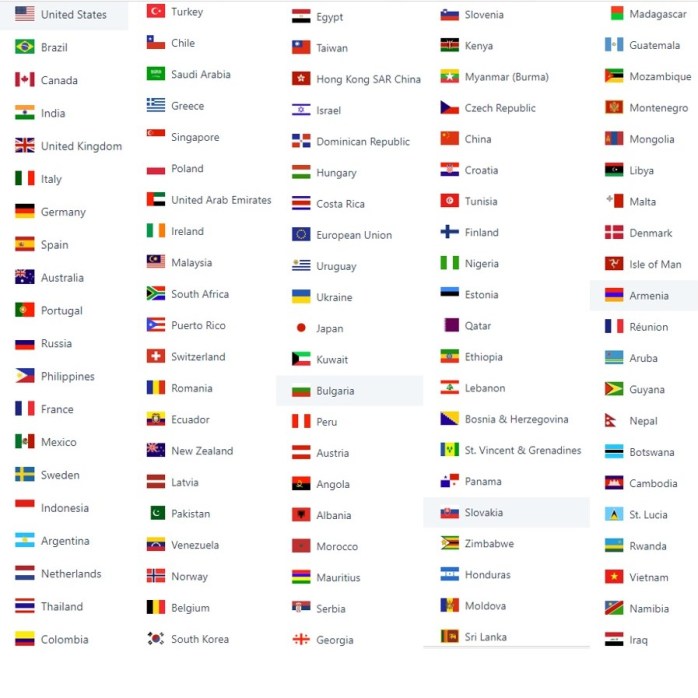
I can’t believe that this week Consultant-Tips has now been viewed in over 100 countries, 104 to be exact, as of June 1, 2018! While the vast majority of views are within the US countries including Brazil, Canada, Australia, Italy, and India are now over 1000 readers alone. It’s exciting to see all the flags and countries represented. Thank you to everyone. There is so much more to come in 2018. Here’s the list…thought my readers might find this pretty cool.
Click on my image below for my Professional Profile

 consultant-tips.blog
Comments