J.D. Power Airline Satisfaction Results – United in Dead Last (again)

The J.D. Power 2019 North America Airline Satisfaction Study was released yesterday. I look forward to seeing these results every year so I can remind myself that my loyalty and decision to exclusively fly Delta continues to be the right choice. The big news from the report this year is that the overall satisfaction ratings went up by 11 points to an all-time survey high. Speculation is passengers have seen huge improvements with new planes, lower prices and improved in-flight amenities.
No major surprises with the ratings which are based on responses from 5,966 passengers who flew a major North American airline between March 2018 and March 2019.
Among the US carriers, Alaska Airlines ranked the highest with a score of 801 followed by their partner, Delta Air Lines, with 788. It’s not apples to apples as Alaska has limited options for flights on the east coast and so I can’t give Alaska Airlines huge kudos. I mean who does fly them?? SEA to LAX sure, but how enough voters came in to name Alaska #1 makes me scratch my head.
I was surprised to see American Airlines come in third with a score of 764 as they are so often complained about. Another one that makes me chuckle is Air Canada, who came in with a score of 729. My favorite result, which was no surprise, is last place…United Airlines, with a score of 723. The huge score difference between United and Delta is significant enough to make me smile cheek to cheek. I feel bad for my fellow travelers who still fly this airline.
Among the low-cost carriers, for those few consultants who actually fly them, include Southwest and JetBlue tied at 817, followed by WestJet (758), Spirit Airlines (711) and Frontier Airlines (702).
The biggest disappointment of air travel according to the survey? In-flight services, such as seatback entertainment, food service and Wi-Fi, continue to be ranked the lowest. These are all areas that are always being improved, so I get that you won’t make everyone happy.
Where did your airline rank? Agree with these results? Share your comments below.
Drug Testing…a Cannabis discussion for Consultants

While I don’t use any cannabis products I have a lot of friends and professional colleagues who do. I was thinking about the impact to those in our industry of consulting and client policies regarding use and screenings. There are tons of articles on traveling with pot, but what about drug testing requirements for consulting firms and/or clients and use while on engagement?
First, a quick snap shot of the law. 5 years ago Colorado became the first US state to legalize marijuana. Today a total of 9 states (and District of Columbia) have legalized marijuana for recreational use including; Alaska, California, Maine, Massachusetts, Michigan, Nevada, Oregon, Vermont, and Washington. These states allow you to have 1 oz of usable marijuana in possession and you can even have up to 6 plants in your home. Plus there are 33 states that have legalized for medical purposes. So, if you are engaged in one of these 9 states, or have a medical card, you should be permitted to use…right?
Without a question marijuana is becoming as normal as smoking cigarettes or drinking a glass of wine. And we all know as a consultants, these activities should be limited to when off client time and property, which is obvious. The question however remains, what are client requirements for drug testing…and how do these laws impact us as consultants when traveling? Let’s take a look at testing.
Testing conducted, according to the Substance Abuse and Mental Health Services Administration (SAMHSA) guidelines, check for five illicit drugs including; Amphetamines (meth/ecstasy), Cocaine, Opiates (heroin/codeine), Phencyclidine (PCP), and yes…THC. Several hospitals have an 8-panel test that also adds Barbiturates, Benzodiazepines, and Methaqualone to the list…especially in states like Indiana, Georgia, Alabama, and Texas. Almost all drug testing is completed via urine, but could include blood or hair, which looks at a longer history of use. While levels of detection requirements vary, the presence of any may result in a review to determine eligibility of employment.
You’ll also want to look at the potential engagement state laws regarding drug testing. Louisiana is an interesting state, for example, that while private companies may request drug screening, they cannot discharge or refuse employment based on results. However, right next door on both sides in Texas and Mississippi employers can terminate based on results and/or candidate refusal to have test completed.
In interviewing several consultants, representing 10 different firms, only 2 firms have drug pre-screening requirements for employment. The other 8 base drug screenings, and immunization requirements, based on client requests. So while you may get hired for a firm, you may not qualify for certain engagements with certain requirements. One engagement that I remember not qualifying for was Dayton Children’s Hospital, as they tested for nicotine (which is unprecedented). I could not find details on their THC requirements, but you can guess what it is.
I would say you want to familiarize yourself with the state laws, client, and the firm’s requirements. This map showing legalization status may help when talking to recruiters if you are a cannabis user. I think there is an argument to be made that if one consultant can drink wine then why can’t the other consultant smoke marijuana. There are several articles out there stating that employers are no longer testing or reviewing results for THC…but that’s in states like CA, CO, MA, and NY. Ask your recruiter what the expectations are to be on the safe side. I’ve seen consultants be escorted off property after being screened…it has to be a terrible experience.
What are your thoughts? Share your comments below.
Does this drive anyone else crazy??
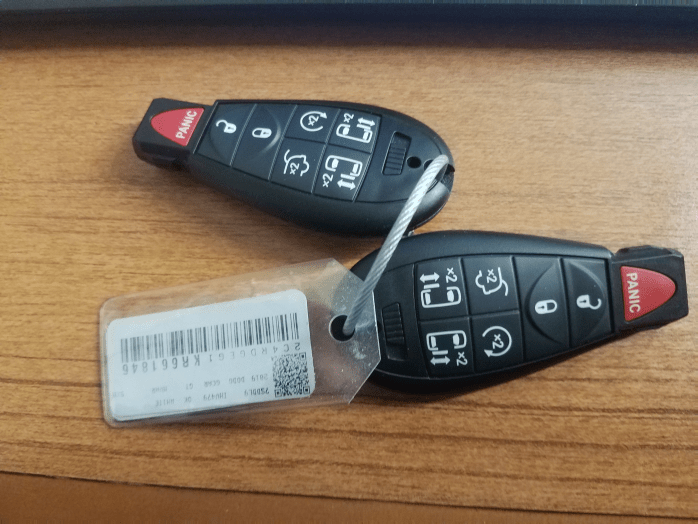
After years of being handed two sets of keys that are bonded together, I finally inquired at National by simply asking…WHY?? The answer still has me dumbfounded. The attendant stated, “All cars have two sets of keys and we need to keep them together.” That has to be the stupidest thing I’ve ever heard!! What if I lose these?? Now you have no keys! I didn’t want to argue, so I just walked away. Does anyone else think this is just silly and drive you crazy as me?
I don’t carry a bag or briefcase to most my client meetings, so these big bulky things usually have to go in my pocket everywhere I go. This weeks gems are 3.5″x2″ each with a warning tag and a large metal wire key ring. Very uncomfortable in my suite pants, too big to go in my suit jacket, and awkward to put on table with my phone and notebook. I know my female colleagues are laughing at me, but they all have a purse or bag, so it’s not the same. I know this isn’t earth shattering stuff here folks…just need to know I’m not alone out here.
Been handed these monstrosities before? Share your comments below.
A Slushy Winter Wonderland expected at XGM

The joys of winter travel….wait, isn’t it almost May?? Both American and United airlines are already offering vouchers and free exchange for flights today through Monday to Illinois and Wisconsin. While the brunt of the storm and snow accumulation is expected to happen today, it may cause havoc for travelers tomorrow and Monday as well. Southwest Airlines is also offering to waive change fees if traveling today or tomorrow to MDW or Milwaukee (MKE).
Most of us have to connect through ORD, but DTW is going to be the best option for Sunday travelers if you don’t have a direct option into Madison. You could also just wait and see, but the risk is being delayed for hours and/or canceled flights. I would suggest be proactive and call today.
Madison could get up to 10 inches, making Epic’s campus a winter wonderland for their guests at XGM. However, it’s going to be in the 50’s on Monday and rain all week…making for a slushy messy week.
Delta reduces how far you can recline…Thank You!

The frequent flyers I’ve talked to this week are happy about this announcement. Most of us want to work during our flights. I barely have enough room before my fellow passenger infront of me reclines to the full extent on our 60 minute flight to Detroit. Really?? You need to recline the minute we get in the air? I personally think the only time to recline is on a red eye, when everyone else is sleeping.
Starting April 13th, Delta will change all their airbus A320 planes (60+) to reduce the recline of coach seats from 4 inches to 2 and first class from 5.5 to 3.5. Doesn’t sound like much, but looking at pictures of it online, it should help with the laptop issue. If this was legroom, we would have an issue….but not the case here.
What are your thoughts? Are you one of those who recline all the time? Leave your comments below.
Epic XGM 2019 – How Consultants might Participate

With Epic’s series of Advisory Councils and Roundtables kicking off on April 29th, clients are preparing to send their teams to Verona, WI to share and obtain information with other clients across the country. This time of year I am often asked how as a consultant can we participate and benefit. No doubt these sessions are extremely valuable to Epic’s customers with opportunities to exchange best practices, success stories, and hear from Epic directly on a wide range of topics including upcoming system enhancements. But with attendance limited to clients, how can we benefit?
I had the opportunity in the past to participate in Project Managers Advisory Council (PMAC) as I was leading efforts on an implementation. Typically consultants in PM or Project Director level roles may be able to register to attend as representatives of their client. Rarely are analysts, builders, or trainers given this opportunity. However, your client will no doubt be looking to send teams of resources over the 2 weeks of sessions, and you should be prepared to assist anyway you can.
One way, is to inquire on your clients level of participation (i.e. presenting), and ask if you can assist with pulling those materials together. XGM is meant to be an exchange of information and clients are presenting case studies, best practices, and lessons learned to other organizations. By assisting with developing these materials, you are not only contributing to the event, but will likely receive the feedback from the team when they return. Comparisons to approach and methodologies are essential to keep your skills up to date, so ask to hear how the presentation was received and what variances of success stories where shared by others.
The council and roundtable sessions are application area focused. The number of application groups is pretty impressive and include areas for clinical, financial, ancillary, Oncology, Home Health, Pharmacy, Population Health, Scheduling, Security, and many more. Be sure to go to the UserWeb and find out when your groups event is and inquire who is going from your client (click here for a full schedule). Then based on your focus area, ask how you can learn from those attending. If you are a trainer for example, inquire on who from your team will be attending the Training Advisory Council (TAC). The expectation for this group is usually panel discussions and sharing of materials. Ask if you the materials obtained can be shared when the team returns.
Much like UGM, XGM access is primarily limited to clients. As client partners, advisors, and team members, we all can benefit and learn much from these events. Clients make difficult decisions on who they can send and have an expectation those who do participate will gather information and return to update the teams. You are part of the team…be sure you are updated and educated as well.
Plan to attend XGM or already assisting with presentations? Share your thoughts and comments below.
Time flies by…A quick look at last months HIMSS19 Conference

Thank you to everyone who has reached out to inquire on my blog status. Between conferences, client proposals, and various trips…I took some much needed time. I’m eager to jump back in to weekly discussions and ideas on current trends and activities within our industry as well as some more travel related stories. Always open to suggestions, so certainly let me know your thoughts. First, a couple thoughts on last month’s HIMSS19 conference.
HIMSS19 – This year’s HIMSS conference was just as chaotic and exhausting as ever. Held in Orlando Florida, themes included hundreds of vendor exhibits, cybersecurity overload, and emerging tech in areas of AI, blockchain products, interoperability technologies, and telemedicine offerings. I thought the most surprising part was EHR vendor signage that called out competitors and were far more aggressive with accusations of misleading statements and favored products.


I lost count after seeing over 30 consultant firm booths ranging in sizes and shapes. The big guys like Deloitte, Accenture, Leidos, and Nordic had extensive booths that had luxurious furniture, cubicle offices, endless signage with looping videos and dozens of employees. My firm, and many others, had variations of conference space outside the vendor showroom for client meetings and education sessions. My favorite is always Epic, sorry…don’t mean to show favoritism, but it’s warm and inviting and fun.


I always wonder about the value of attending these every year. For me it was first and foremost about vendor education/demos for Epic, Cerner, and Meditech. Second is catching up with colleagues and friends, hearing what’s happening at their shop and comparing notes to industry trends. Finally, meeting with clients. My favorite part of the trip was spending 30 minutes chatting with Judy Faulkner at CHIME. We spent that whole time talking about how she took care of us (CHB team) during UGM on 9/11 and the ever growing campus in Verona. I feel fortunate to have that type of access to people at these events.
Check out Healthcare IT News article here for a deep dive into the key note speakers and education sessions. Did you attend? Other take away thoughts? Share your thoughts in comments section below.
Meeting Client Expectations for Improved Quality at Lower Costs…can we do that?
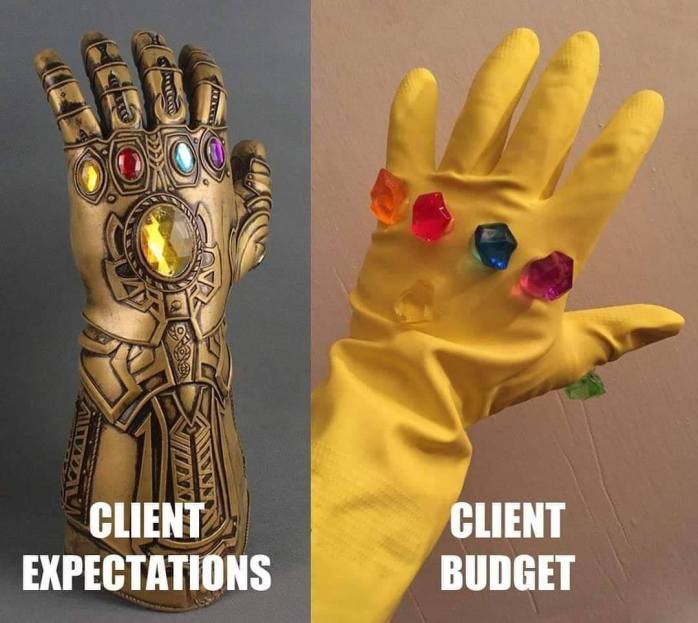
Client demand in Managed Services continues to grow. As consultants we have to ask ourselves, are the deliverable oriented solutions we are supporting meeting our client’s expectations? Are we providing service line agreements and resources that align with overall budget/costs? It’s a challenge that I’m excited to be leading and supporting.
Most of us are seeing a demand for long term managed services that improve quality of support and reduce costs. With continued resource constraints and retention issues, outsourcing provides clients with a different staffing and support option. Here are some areas of growth that you may see this year and have engagement opportunities to support:
- Help Desk Services
- Legacy Support
- EHR Remote Application Support
- System Upgrade Managed Services
- Report Development and Maintenance
- Affiliate System Management
Regardless of what firm you are working at, almost all of the major players are already in this space. As a consultant, opportunities to support clients 100% remotely, and long term, is enticing. I think our responsibility to is ensure we understand the client’s expectations on deliverable outcomes and improved services first. Then we have to think about cost models, usually fixed fee, and how that plays out. Support resources are needed from Project Managers to analysts to trainers….which means we all have an opportunity for long term contract support work.
I know there are many of you out there that will say you don’t want to give up travel and you like the variations of contract to contract. This type of staff aug support will continue in all vendor spaces…so you have options. After being on the road for 15 years, I personally know that many will be eager to grab remote opportunities. We might shed a tear over lost status on Delta or United, but its a small price to pay.
Are you currently on a remote engagement? Seeing other lines of solution offerings? Share your thoughts in the comments section below.
TSA and Air Traffic Control Impact by Government Shutdown

No one can say for sure how long this is going to continue. The government shutdown is now officially in day 18. Areas mostly impacted so far are National Parks, but over the weekend stories broke out of TSA agents calling in “sick,” creating a serious issue for airport security. I just saw online this morning that my local airport is seeking temporary part time TSA staff. Those of us who all travel weekly may be in for some serious delays starting this week.
This shutdown isn’t just TSA agents, its also traffic control staff. If appropriations aren’t agreed upon by tomorrow, about 10,000 air traffic control resources will not get paid. Additionally if you’ve applied for Global Entry, their offices are closed. So no processing of applications or interviews being conducted at this time.
The good news is that about 10,000 air traffic controllers who work for the Federal Aviation Administration and about 51,000 Transportation Security Administration officers have been told to keep reporting to work. But I would still be proactive. I fly out tomorrow. I’ll be arriving to the airport much earlier. I can’t find any information on impact to Pre-Check or Clear lanes. I have to assume priorities have to go to the larger group of travelers, so I won’t be surprised if Pre-Check is closed.
Anyone seeing any impact yet? Share your experience in comments below.
The Villains of Rudolph, Santa, and Frosty – A Fun Holiday Analogy to our world of Consulting

I really enjoy watching the old classic Christmas specials. I think Santa Claus is Coming to Town is my all-time favorite, and love that both Mickey Rooney and Fred Astaire lend their voices. While watching Santa, Rudolph and Frosty this past week I noticed that they each had a character or two that made their jobs much harder. Similar to some engagements we’ve all had, there is always that one person who makes our job more difficult. Is there any lessons from the Christmas specials that we might apply to our job? For those of you who know me, and my fixation with Christmas, I think there are several lessons we can apply for sure.
The young Kris Kringle only wanted to do his job by delivering toys to the children of Sombertown, but Burgermeister Meisterburger made toys illegal. Doesn’t it seem like there is always someone trying to block you from doing what you need to do at work? Thinking creatively to find a solution is imperative to our success. Santa takes the advice of a penguin to deliver toys down the chimney. While he is discouraged several times, his song, “Put one foot in front of the other…”motivates everyone to take on the challenge and get those toys delivered.
Professor Hinkle is a classic bad guy who we all have had to deal with. He had a magic hat, a wonderful tool that brought a snowman to life! He was failing at his job as a magician and never knew how powerful his hat was until the children put it on Frosty’s head. Hinkle later says, “if that hat has magic, I want it back.” Isn’t it so typical to see that one guy at work only want to take credit after you’ve shown others the capabilities of the tools we are supporting? I think we have an opportunity every day to help the Professor Hinkle’s of our daily lives realize the potential of the tools that are sitting right in front of them. Transfer of knowledge should be our number one focus at any client.
Have you ever been put in a role that you weren’t fit for? Rudolph’s pal at the North Pole, Hermey, struggles with his job of making toys. It just wasn’t really his skill set. The Elf manager finally does a great job later realizing they could use an Epic Wisdom expert and moves Hermey from the toy maker department to Dentistry. We should all look at our teams and make sure we identify the strengths of each member to ensure best possible outcome and quality of the delivery of services. I would love to go on with Rudolph, the Island of Misfit Toys alone reminds me of so many engagements over the years. I’m kidding!!
Thank you to all my readers, we will see you in 2019. Happy Holidays to you all and have a wonderful Happy New Year!
Click on my image below for my Professional Profile

 consultant-tips.blog
Comments